The Age Gate Is a Data Door: What ID Checks at the Login Screen Really Collect
Age verification used to be a checkbox. In 2026 it is increasingly an identity checkpoint. A person who wants to read a local forum, watch a video, or join a chat may be asked to upload a driver's license, stare into a camera for an age estimate, or prove an age credential stored in a phone wallet. The stated purpose is child protection. The practical effect is that ordinary adult browsing now generates identity records at the front door.
That shift matters for anyone who relies on a proxy to keep browsing sessions separate from their real-world identity. A proxy can change the network address a site sees. It cannot change the document a person uploads, the face a camera captures, or the account a wallet credential is tied to. The age gate is not just a barrier to entry. It is a data collection point, and it is often operated by a third party that the visitor never chose to trust.
How a modern age gate actually works
The site rarely performs the check itself. It contracts with an age-verification vendor, embeds that vendor's script or redirects the visitor to a hosted flow, and waits for a pass-or-fail signal. The methods vary widely.
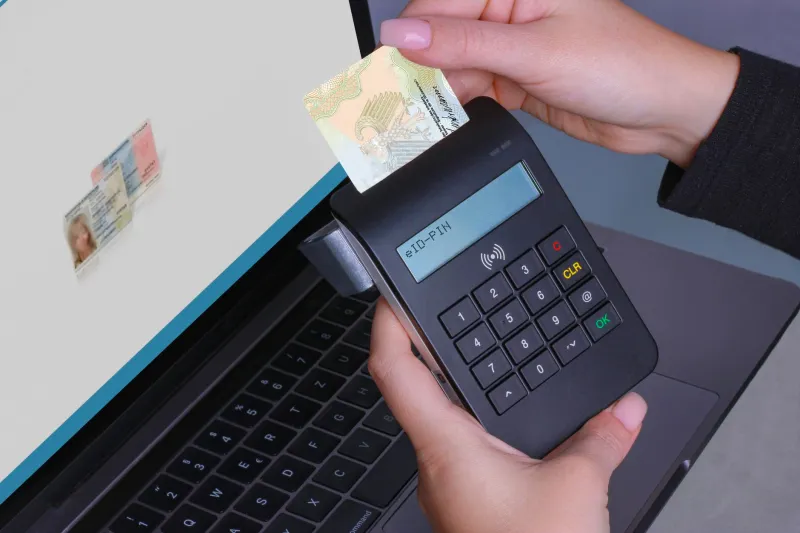
Some systems ask for a government ID and a selfie. The vendor compares the photo to the document, extracts the date of birth, and returns a token saying the user is over a certain age. Others use facial-age estimation, which analyzes a live image and estimates whether the person appears to be an adult. Some rely on a credit card, a bank account, a phone number, or a digital wallet credential that carries an age attestation. A few use zero-knowledge proofs, which can confirm an age threshold without revealing a birth date.
The privacy implications depend on the method. A local facial-age estimate that discards the image is very different from a vendor that stores an ID scan, a selfie, and a name in a cloud database. A reusable age token can be convenient, but it can also become a persistent identifier. If the same token appears across multiple sites, it can link sessions that were meant to remain separate.
Why a proxy is not a fake ID
A proxy is useful for masking the IP address that a website sees. It can prevent a site from tying a visit to a home internet connection. It can also reduce cross-site tracking that depends on network-level identifiers. But an age gate usually sits inside the browser session, not outside it.
The vendor may see the browser's user agent, screen size, installed fonts, time zone, language settings, and other fingerprinting signals. It may set a cookie or write a token to local storage. It may require an email address or phone number. If the user is signed into a platform account, the age check can be linked to that account regardless of the IP address. A proxy does not erase those signals. It does not make an uploaded passport photo anonymous. It does not prevent a verification vendor from correlating a session with a later login.
This is why a proxy alone rarely defeats an age gate. The gate is not asking where the traffic came from. It is asking who is at the keyboard, and it is collecting enough evidence to make that judgment.
The record that outlives the session
Even when a site says it does not store the ID image, the vendor may retain it for fraud prevention, legal compliance, or dispute resolution. Retention periods can run for months or years. A breach at the vendor can expose documents that were submitted for a trivial purpose, such as reading a forum or watching a video. A subpoena or civil demand can reach the same records.
The more subtle risk is linkage. Suppose a user maintains a pseudonymous handle and visits a site through a proxy. The site requires age verification. The vendor records the user's legal identity, the time of verification, the IP address at the time, and a device fingerprint. Later, the user posts under the pseudonym from a different IP address. If the site or a third party can connect the verification event to the posting session through a cookie, a device signal, or a login, the pseudonym is no longer separate from the legal identity.
Adults may respond by avoiding sites that require verification. That is a rational privacy choice, but it also creates a chilling effect. Forums, educational resources, and community spaces become less accessible to people who do not want to hand over an ID. The policy question is whether that trade-off is necessary, proportional, and transparent.
A practical checklist for adults
- Prefer sites that offer privacy-preserving age proofs, such as zero-knowledge attestations or local age estimation that does not transmit an image.
- Read the verification disclosure before uploading anything. Look for who receives the data, how long it is retained, and whether it is shared with marketing partners.
- Avoid submitting a full ID when a narrower proof would satisfy the requirement. Ask whether a wallet credential or a verified age token is accepted.
- Use a separate browser profile for sites that require verification, and avoid signing in with an email address that is tied to other identities.
- Check whether the vendor offers a deletion request process. Exercise it after the verification is complete if the law provides that right.
- Treat facial scans as sensitive biometric data. If a site offers a non-biometric alternative, consider using it even if it is less convenient.
- Remember that a VPN or proxy is not a substitute for an age credential. It protects the network path, not the identity document.
The age gate is here to stay in many US jurisdictions. The question is whether it will be designed as a narrow proof of age or as a broad identity collection system. For now, the burden falls on users to read the door before they walk through it.